Skip to content

Launch Sale

25% off selected items for a limited time.

Ends in -

Pennon — Announcement Bar & Popup Campaigns

Rated 5.0 out of 5 from 1 review.

by Fernwick Studio Verified New

in Plugins

Create announcement bars, popups and slide-ins with countdowns, scheduling, targeting, frequency control and private local stats. No jQuery.

Version
1.0.0
Updated
Sales
New
Compatibility
WordPress 5.8 - 7.1, PHP 7.4 - 8.2

About

Pennon - Announcement Bar & Popup Campaigns — Announcement bars, popups and slide-ins with countdowns, scheduling, targeting and private stats.

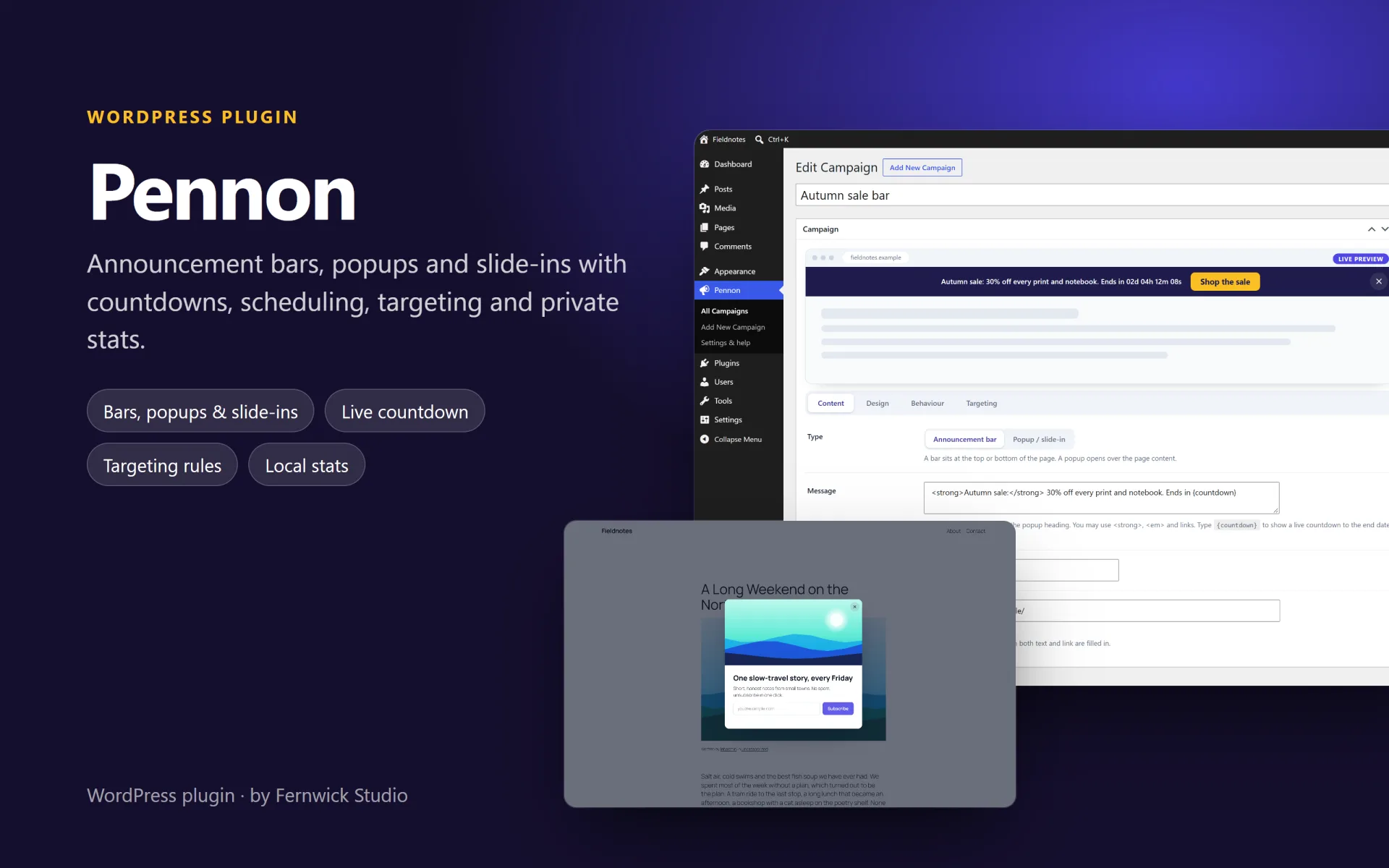
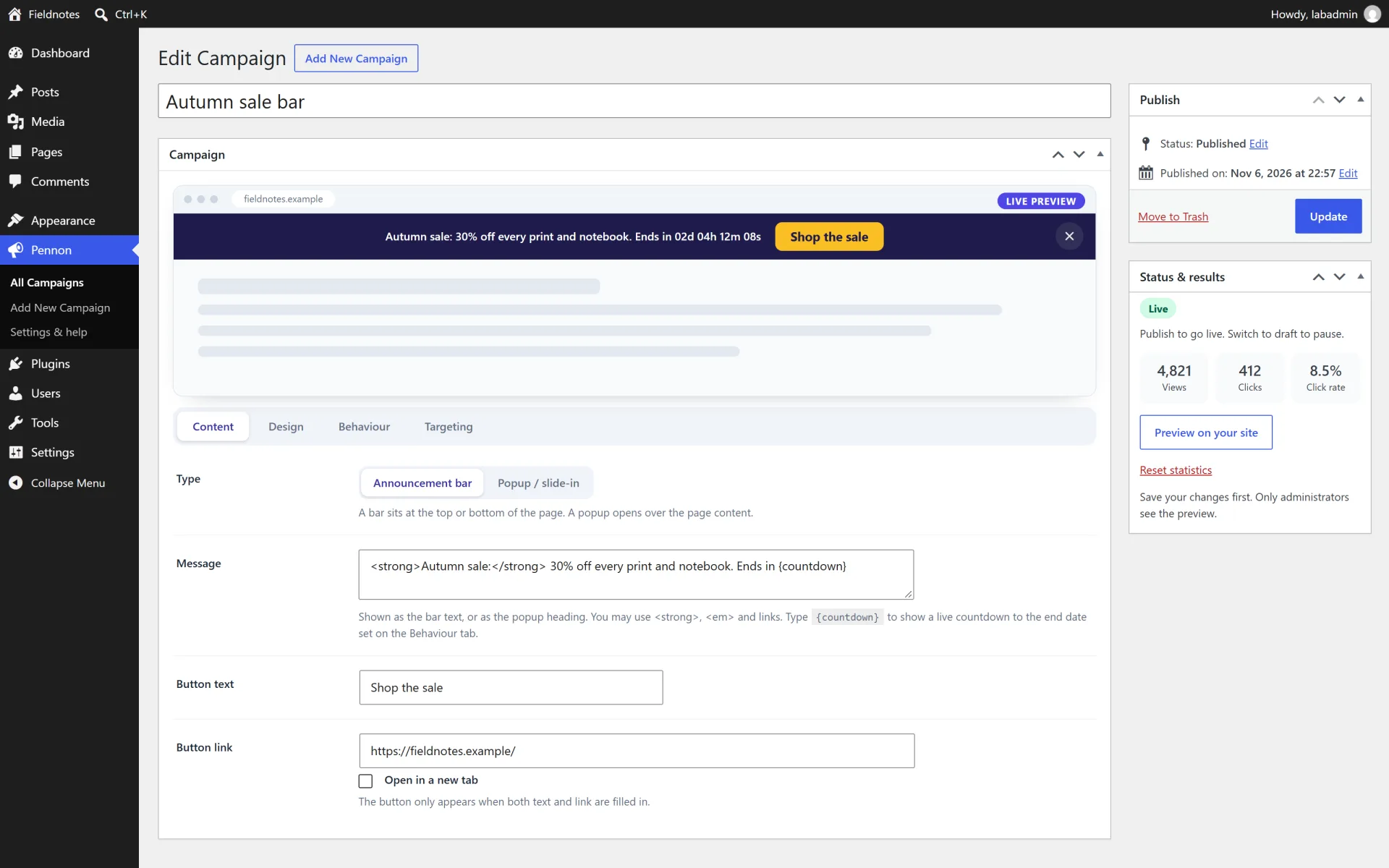
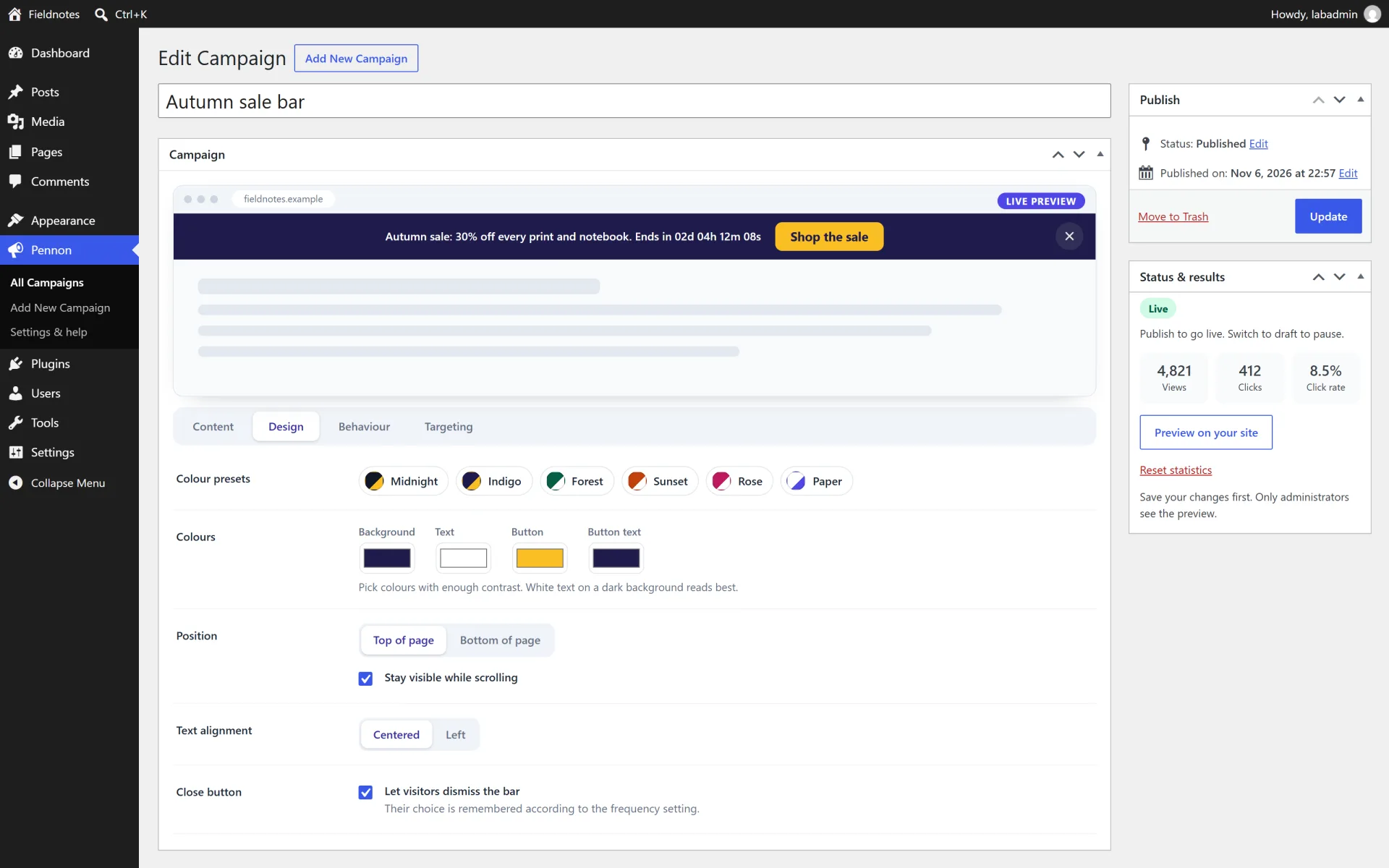
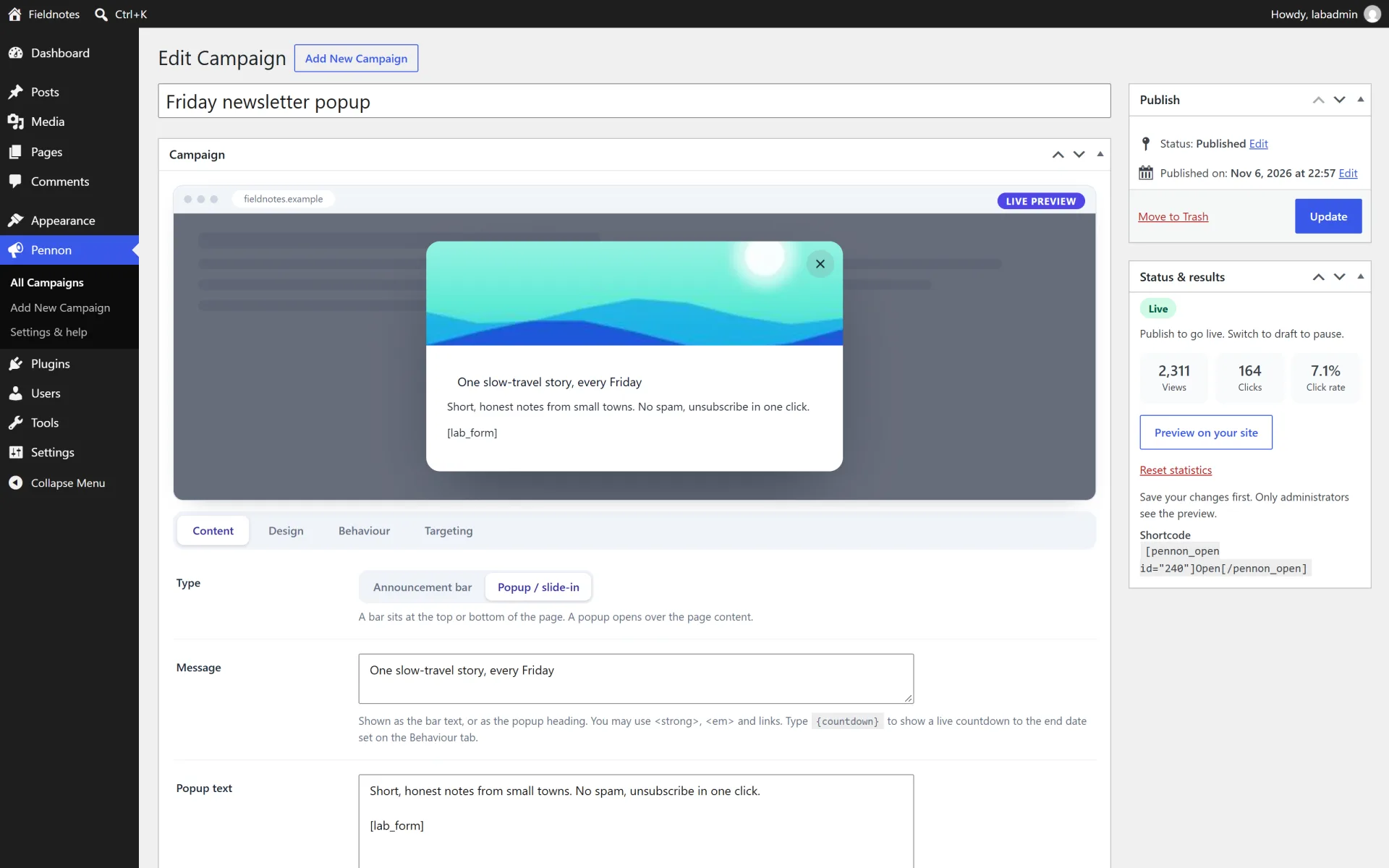
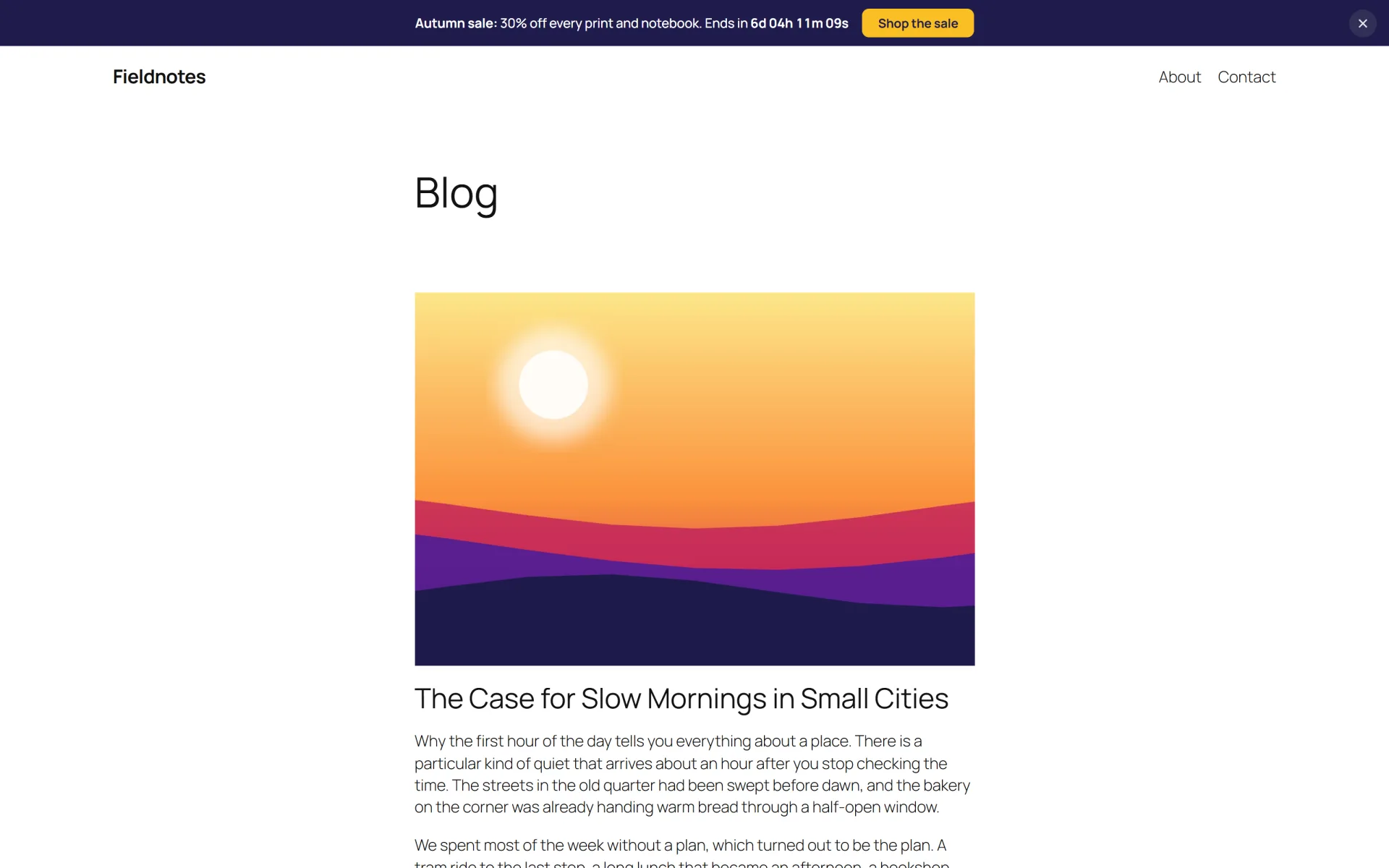
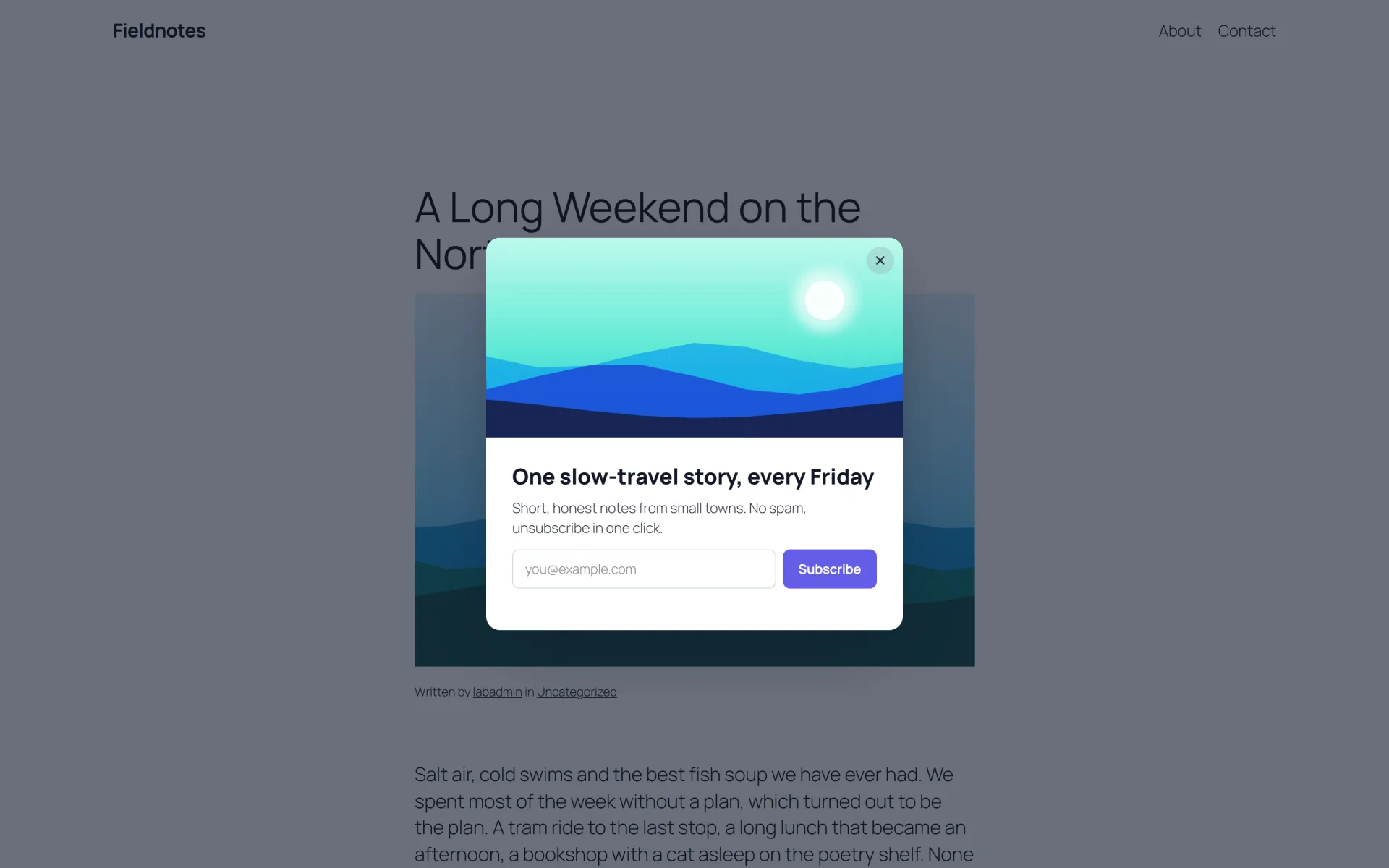
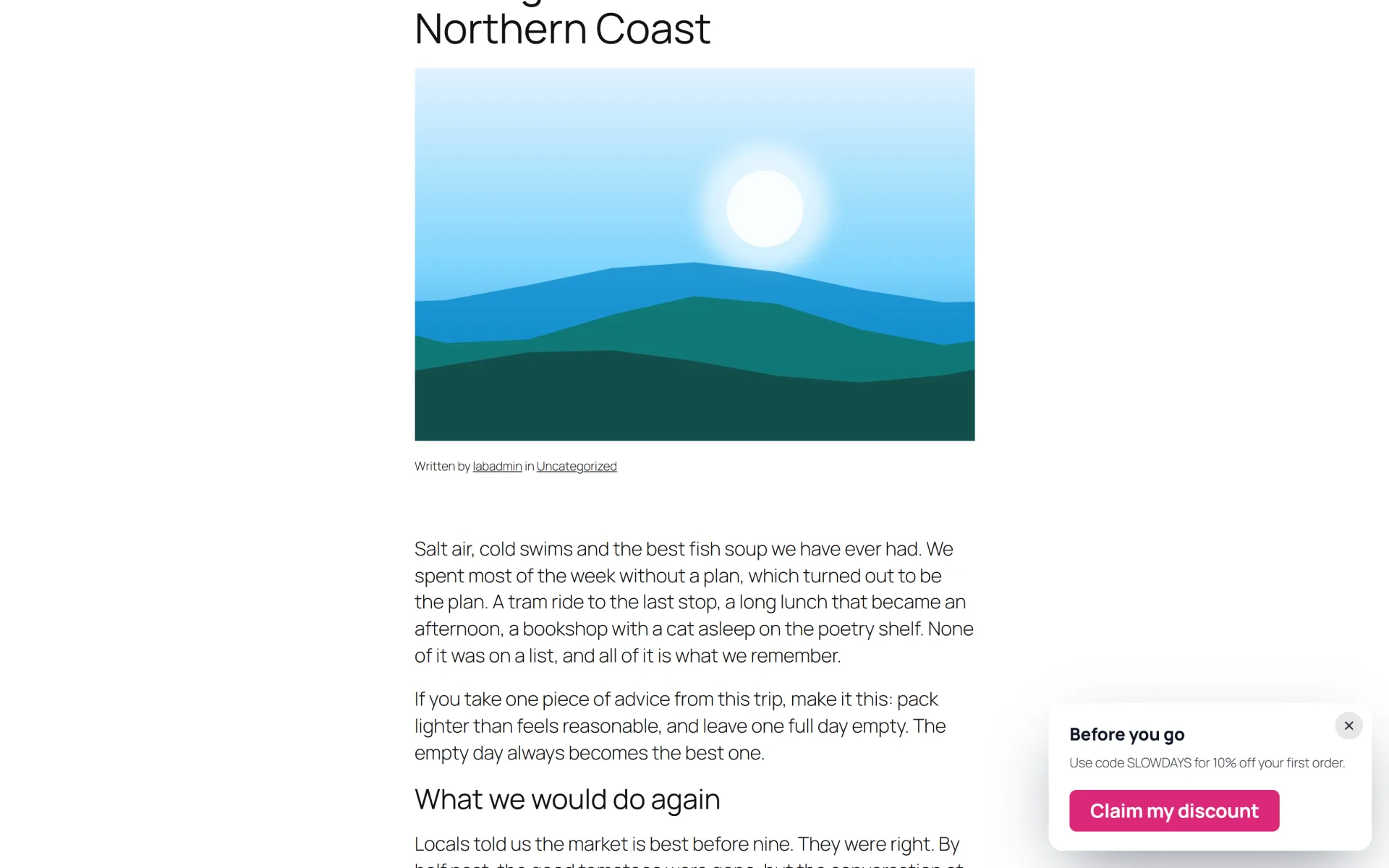
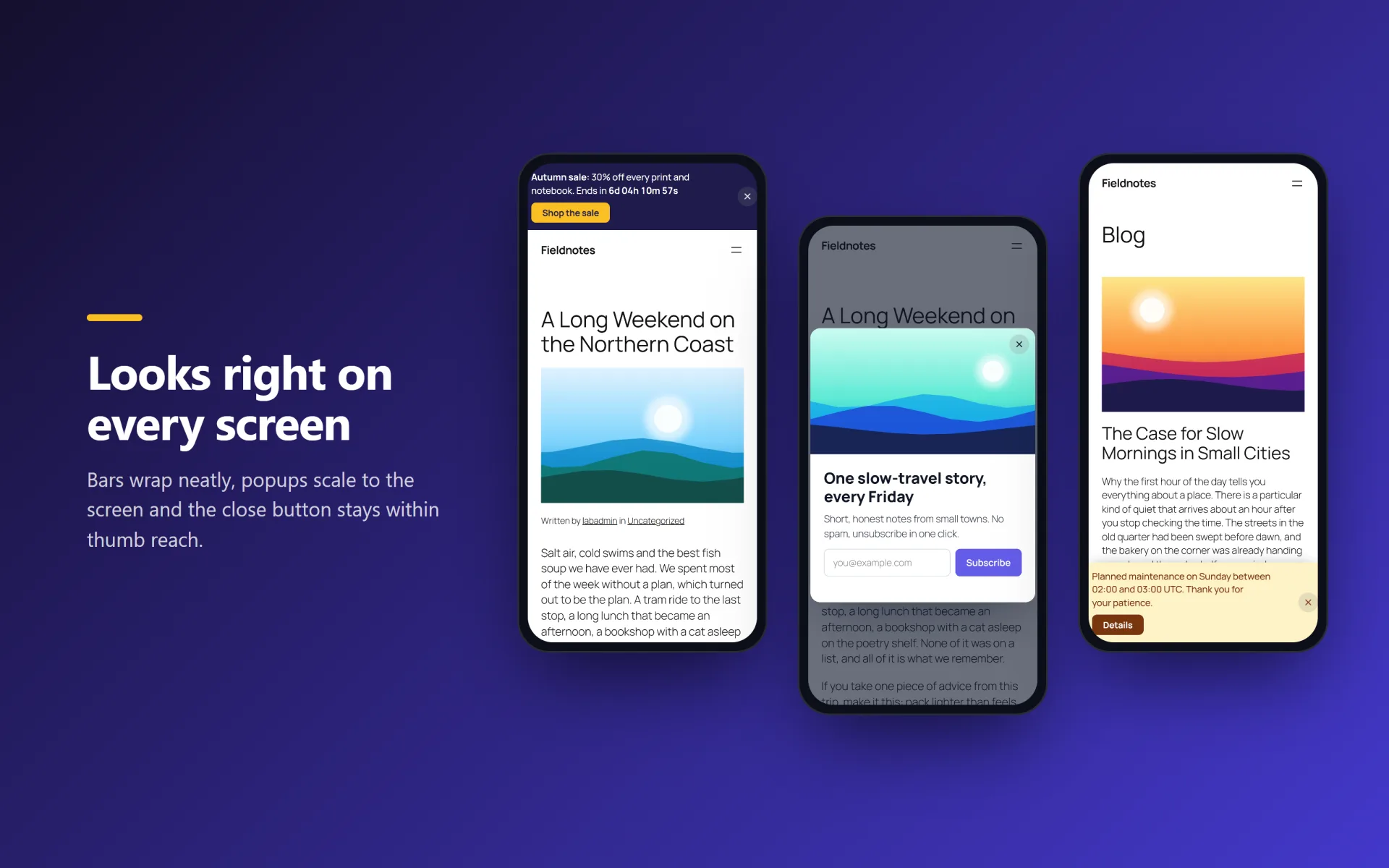
Pennon lets you publish campaigns on your site: a slim announcement bar at the top or bottom, a centered popup, or a corner slide-in. Write the message, pick colours with one click, choose when and where it appears and press Publish. A live preview in the editor shows exactly what visitors will see.

Campaigns can run on a schedule, count down to the end of an offer, target page types, logged-in state and devices, and remember a dismissal in the visitor's browser. Views, clicks and closes are counted locally as plain numbers, with no cookies and no external services.

What you get

  • Three formats in one: announcement bar (top or bottom, sticky or static), centered popup and corner slide-in
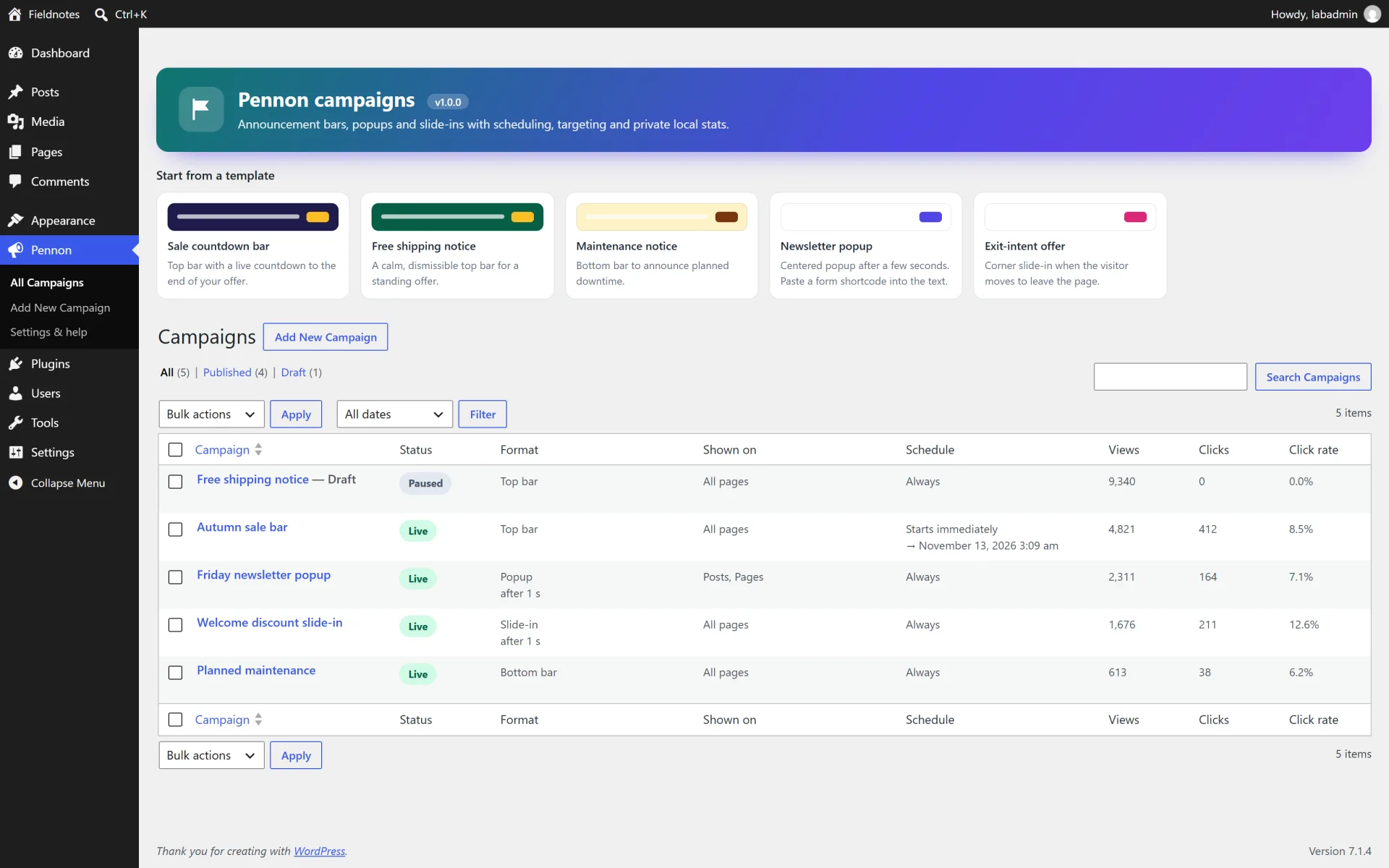
  • Five ready-made starter templates: sale countdown, free shipping, maintenance notice, newsletter popup and exit-intent offer
  • Live preview inside the campaign editor, six colour presets and four free colour pickers
  • Live countdown with {countdown} in the message. The campaign ends by itself at the end date
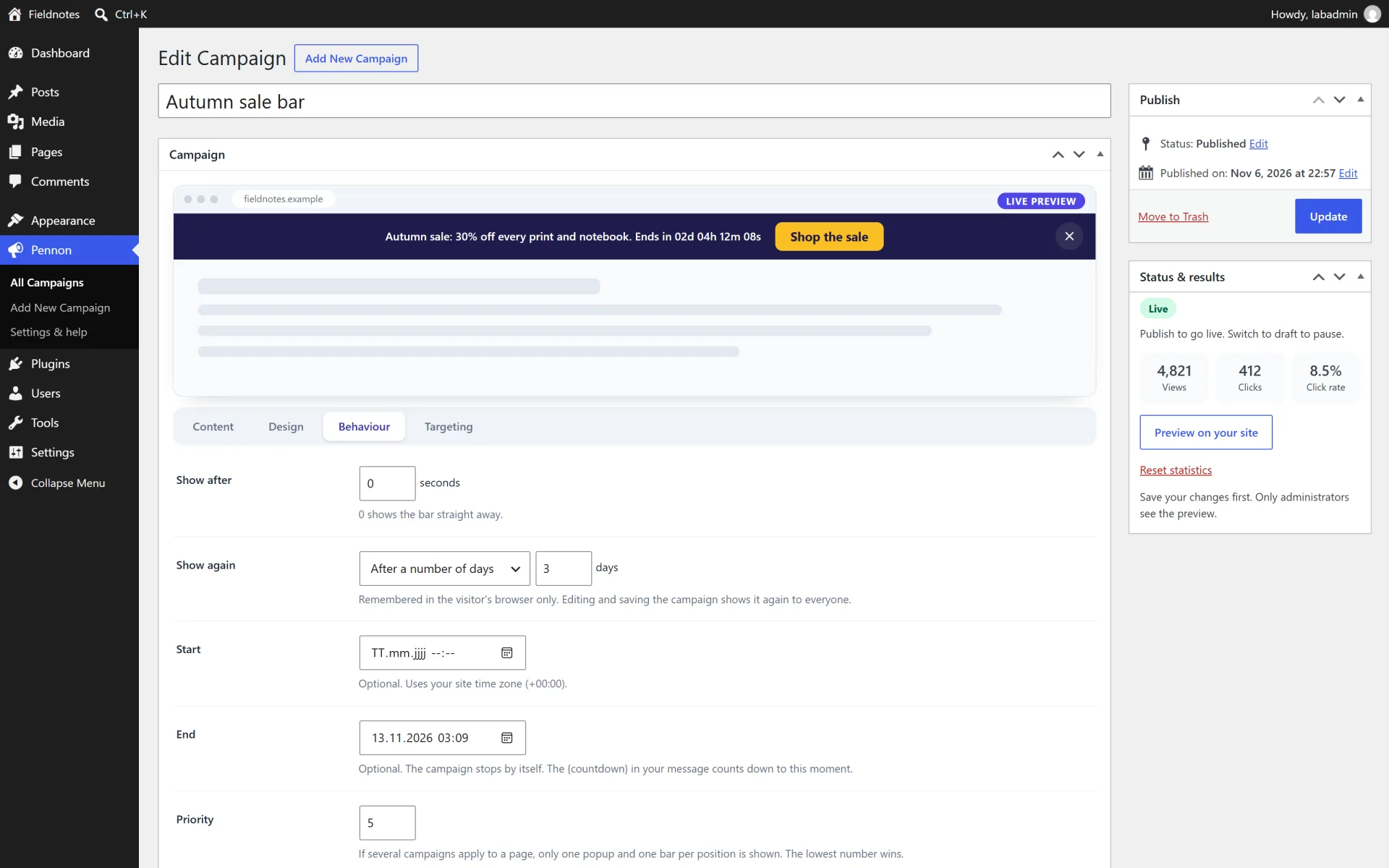
  • Start and end scheduling in your site time zone
  • Popup triggers: after a delay, after scrolling a percentage, on exit intent or only when clicked (button shortcode, #pennon-open-ID link or JavaScript)
  • Frequency control: every page view, once per session or once per number of days. Editing a campaign shows it again to everyone
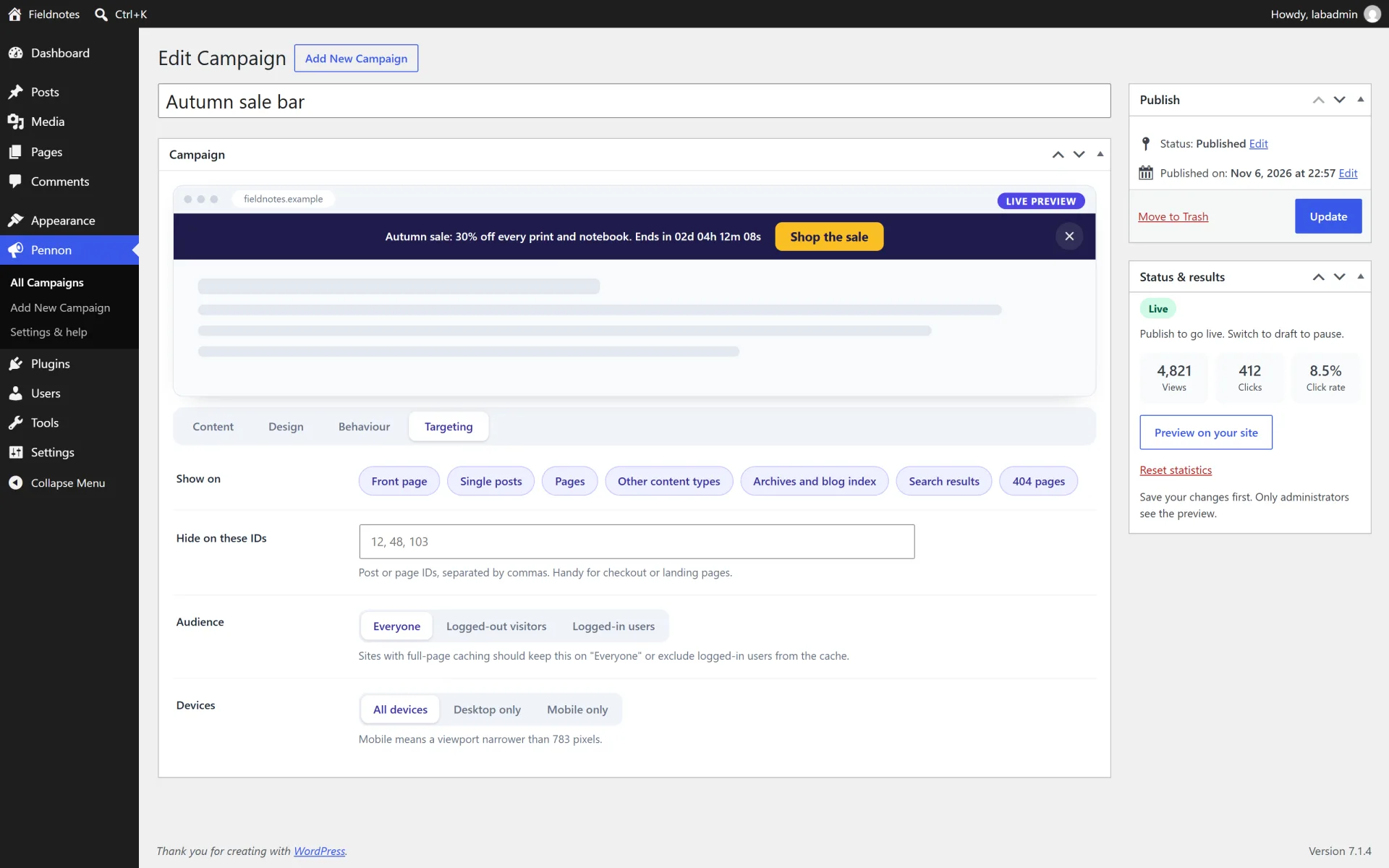
  • Targeting: front page, posts, pages, other content types, archives, search, 404, excluded IDs, logged-in state and desktop or mobile
  • Priority rules: only one popup and one bar per position are shown, the lowest priority number wins
  • Optional image and shortcode support in popups, for example the form shortcode of your newsletter plugin
  • Private local stats: views, clicks and click rate per campaign, shown in the list. No cookies, no personal data
  • Accessible popups: dialog semantics, focus trap, Escape to close, focus returns to the trigger, reduced-motion friendly
  • No jQuery. Assets load only on pages where a campaign is shown
  • Pause, activate, duplicate and preview any campaign from the list. Translation ready with a .pot file

How it works

Bars. Choose "Announcement bar", write a message and optionally a button. Type {countdown} in the message and set an End date to show a live timer. A top bar that is sticky stays visible while scrolling, a bottom bar is pinned to the screen edge.

Popups and slide-ins. Choose "Popup / slide-in" and pick a layout. Triggers: after a delay, after scrolling, exit intent (desktop only) or only when clicked. Visitors close a popup with the close button, the Escape key or, if enabled, a click on the overlay.

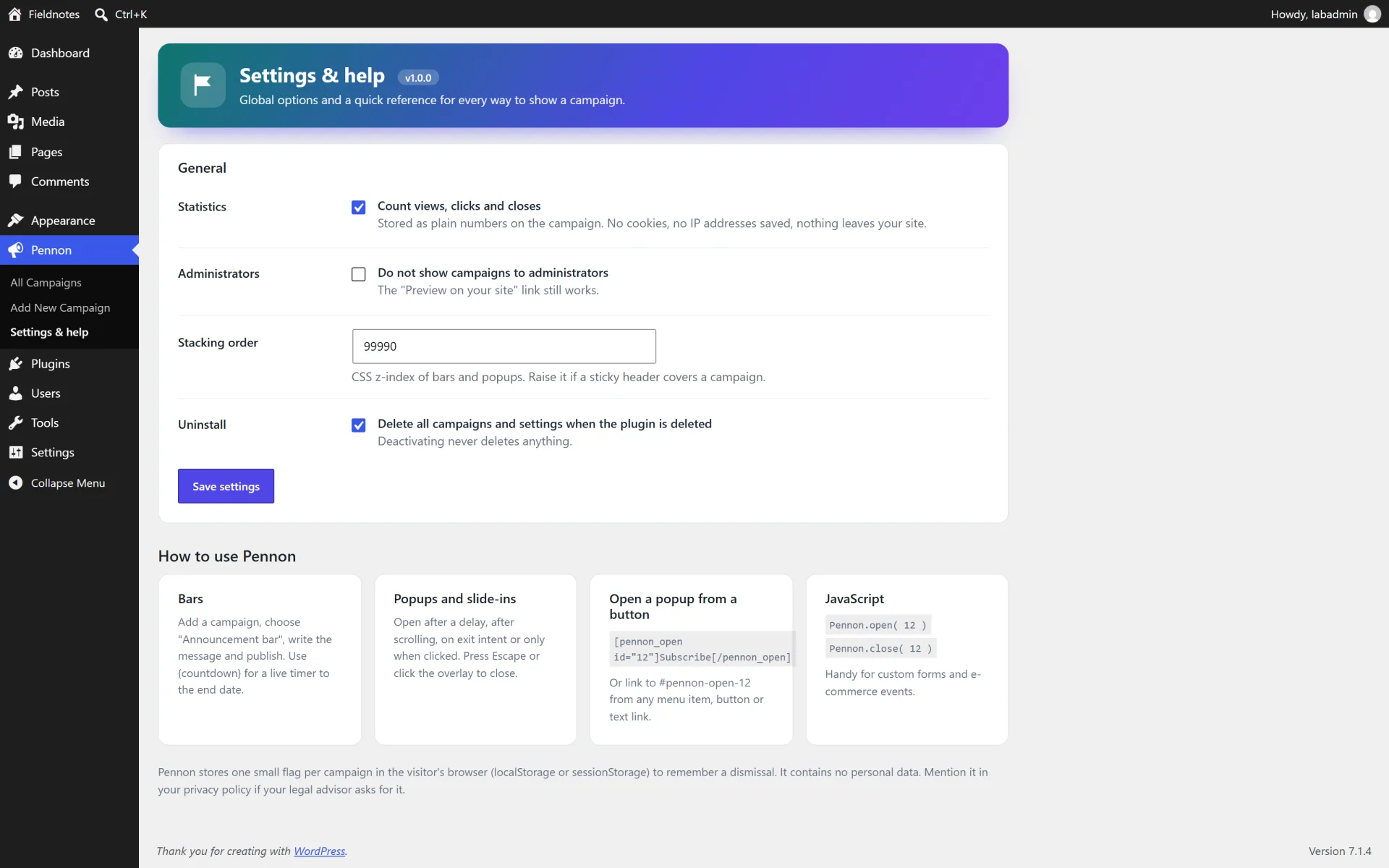
Open a popup from a button or link. [pennon_open id="12"]Subscribe[/pennon_open] prints a button. A link to #pennon-open-12 works from menus and text, and Pennon.open( 12 ) / Pennon.close( 12 ) work from your own JavaScript. The popup is printed on that page even if its targeting would normally exclude it.

Scheduling and frequency. Start and End use your site time zone. A dismissed or shown campaign is remembered in the visitor's browser (one small flag in localStorage, or sessionStorage for "once per session"). Saving a campaign again resets that memory for everyone.

Targeting. Pick the page types, add post or page IDs to exclude, and choose everyone, logged-out visitors or logged-in users and all, desktop or mobile devices. If several campaigns apply, one popup and one bar per position are shown and the lowest priority number wins.

Statistics. Views, clicks and closes are stored as numbers on each campaign. A visitor is counted at most once per 30 minutes for views and five times per minute for clicks and closes. Administrator previews are never counted. Switch statistics off in Pennon > Settings & help.

Caching. Page rules and schedules are evaluated on the server and again in the browser, so cached pages still stop showing an expired campaign. Audience rules (logged-in or logged-out) need a cache that varies by login state.

Not included (so there are no surprises)

  • Email collection and sending. Pennon shows your own form (through a shortcode) but does not store subscribers or connect to mailing services.
  • A/B testing, a drag-and-drop page builder or revenue analytics.
  • Exit intent on touch screens (phones have no cursor to leave with).
  • Audience rules based on cookies, referrers, countries or WooCommerce carts.

Install in minutes

  1. In your WordPress admin open Plugins > Add New > Upload Plugin and choose the downloaded zip (pennon-announcement-bar-v1.0.0.zip), then Install Now and Activate.
  2. Open Pennon > All Campaigns. Click a starter template or use Add New Campaign.
  3. Write your message, choose colours on the Design tab, set the trigger, schedule and frequency on the Behaviour tab and the pages on the Targeting tab.
  4. Press Publish to go live. Use "Preview on your site" in the Status box to check it first (only administrators see the preview).
  5. Optional: visit Pennon > Settings & help to change the stacking order, switch statistics off or hide campaigns from administrators.

What is in the download

  • The ready-to-upload WordPress plugin (pennon-announcement-bar), organised in namespaced PHP classes
  • readme.txt in WordPress.org format, a full HTML documentation page in docs/ and a CHANGELOG.md
  • license.txt (GNU GPL v2) and a translation template in languages/
  • A clean uninstall: removing the plugin from the Plugins screen deletes its data unless you choose to keep it

About the screenshots

The gallery shows the plugin running on a private test site ("Fieldnotes") with sample posts and sample statistics, not a public demo. There is no hosted live demo for this plugin.

Third-party product and network names mentioned are trademarks of their respective owners. This plugin is an independent product and is not affiliated with or endorsed by them.


Author’s detailed specifications

Additional package and setup details from the author. The purchase options and marketplace license terms govern your order.

Requirements

  • WordPress 5.8 or newer (tested up to 7.1)
  • PHP 7.4 or newer (tested on PHP 8.2)
  • Any theme that calls wp_footer(). A theme that also calls wp_body_open() is not required

Licensing

The plugin source is licensed under the GNU General Public License v2 or later (see license.txt), as for every WordPress plugin. What you buy here is the packaged, supported release: the download, updates published on this listing and author support through the marketplace.

  • Regular — one end product, for your own site or a single client site, where end users are not charged for access.
  • Extended — one end product you may charge customers for, for example a paid membership site or a client service you resell.

These marketplace licence terms describe who the support and update entitlement covers. They do not take away the rights the GPL grants you.

Features

  • Three formats in one: announcement bar (top or bottom, sticky or static), centered popup and corner slide-in
  • Five ready-made starter templates: sale countdown, free shipping, maintenance notice, newsletter popup and exit-intent offer
  • Live preview inside the campaign editor, six colour presets and four free colour pickers
  • Live countdown with {countdown} in the message. The campaign ends by itself at the end date
  • Start and end scheduling in your site time zone
  • Popup triggers: after a delay, after scrolling a percentage, on exit intent or only when clicked (button shortcode, #pennon-open-ID link or JavaScript)
  • Frequency control: every page view, once per session or once per number of days. Editing a campaign shows it again to everyone
  • Targeting: front page, posts, pages, other content types, archives, search, 404, excluded IDs, logged-in state and desktop or mobile
  • Priority rules: only one popup and one bar per position are shown, the lowest priority number wins
  • Optional image and shortcode support in popups, for example the form shortcode of your newsletter plugin
  • Private local stats: views, clicks and click rate per campaign, shown in the list. No cookies, no personal data
  • Accessible popups: dialog semantics, focus trap, Escape to close, focus returns to the trigger, reduced-motion friendly
  • No jQuery. Assets load only on pages where a campaign is shown
  • Pause, activate, duplicate and preview any campaign from the list. Translation ready with a .pot file

Your purchase includes

Compatibility

Works with
WordPress 5.8 - 7.1, PHP 7.4 - 8.2
Supported software
WordPress 5.8+, PHP 7.4 - 8.2
Platform
Self-hosted WordPress
Framework
WordPress

Tags: Announcement Bar Popup Notification Bar Countdown Promo Banner Slide In Marketing

Browse more in Plugins, or see all items by Fernwick Studio.

FAQ

Common questions about this listing.

Does Pennon send data to an external service?

No. Everything runs on your own site. Statistics are plain numbers in the database and nothing is loaded from other servers.

Can it collect email addresses?

Pennon does not store subscribers. You can paste the form shortcode of your newsletter plugin into the popup text and Pennon will display it.

Does it need jQuery?

No. The front-end script is small vanilla JavaScript and only loads when a campaign is shown on the page.

How do I show a countdown?

Put {countdown} in the message and set an End date on the Behaviour tab. The timer updates every second and the campaign hides itself at zero.

Can I schedule a campaign in advance?

Yes. Set Start and End. Campaigns outside the window are not printed and are re-checked in the visitor's browser, so cached pages stay correct.

How do I stop a popup from annoying visitors?

Use "Show again" to show it once per session or once every number of days. When a visitor closes a popup, or sees it, the choice is remembered in their browser. Exit intent and "only when clicked" triggers give more control.

Does the exit-intent popup work on phones?

No. Exit intent relies on the cursor leaving the window, so it never fires on touch screens. Use a delay or scroll trigger for mobile audiences.

What if several campaigns match one page?

Only one popup and one bar per position (top and bottom) are shown. The campaign with the lowest priority number wins.

Is it accessible?

Bars are labelled regions. Popups use dialog semantics, trap keyboard focus while open, close with Escape, return focus to the trigger and honour the reduced-motion setting.

Is it compatible with caching plugins?

Yes. Targeting by page type and schedules work with page caches. Audience rules (logged-in or not) require a cache that varies by login state.

Is it translation ready?

Yes. All text is translatable and a .pot file is included.

What happens when I delete the plugin?

By default campaigns, settings, statistics and temporary data are deleted. You can keep them by switching off "Delete all campaigns and settings when the plugin is deleted". Deactivating never deletes anything.

Version history

Release notes for this item, newest first.

Current v1.0.0

  1. v1.0.0

    Current
    Initial release.

Log in after purchase to download version files.

Reviews

5.0

1 review

5 stars 1
4 stars 0
3 stars 0
2 stars 0
1 star 0

Only people who bought this item can review it, which keeps ratings honest. Sign in if you already bought it.

Sale bar with a countdown that ends itself

Aisha Rahman Reviewed v1.0.0

Used the announcement bar for a weekend shipping offer and the exit-intent popup for a newsletter. {countdown} in the message and the end date that retires the campaign on its own were the parts I did not want to rebuild. Targeting let me keep the bar off the blog and on the shop pages, and the view/click numbers stay on the site. No jQuery, and the assets only load where a campaign is actually shown.

Questions & answers

Ask the seller about setup, compatibility or customisation before you buy.

Sign in to ask the seller a question.

No questions yet

Be the first to ask. Answers from the seller appear right here.

About the author

Small, privacy-minded WordPress plugins

Fernwick Studio Verified New

Fernwick Studio builds small, focused WordPress plugins that stay fast and respect visitor privacy: no trackers, no phoning home, no jQuery unless it is really needed. Every plugin is original work released under the GPL v2 or later, built with the WordPress coding standards and tested on current WordPress releases and PHP 8.2.

All items by Fernwick Studio →

Similar scripts

Pick up where you left off

Recently viewed

Your last discoveries, saved only in this browser.

Pennon — Announcement Bar & Popup Campaigns

USD 24.00